

Common Questions
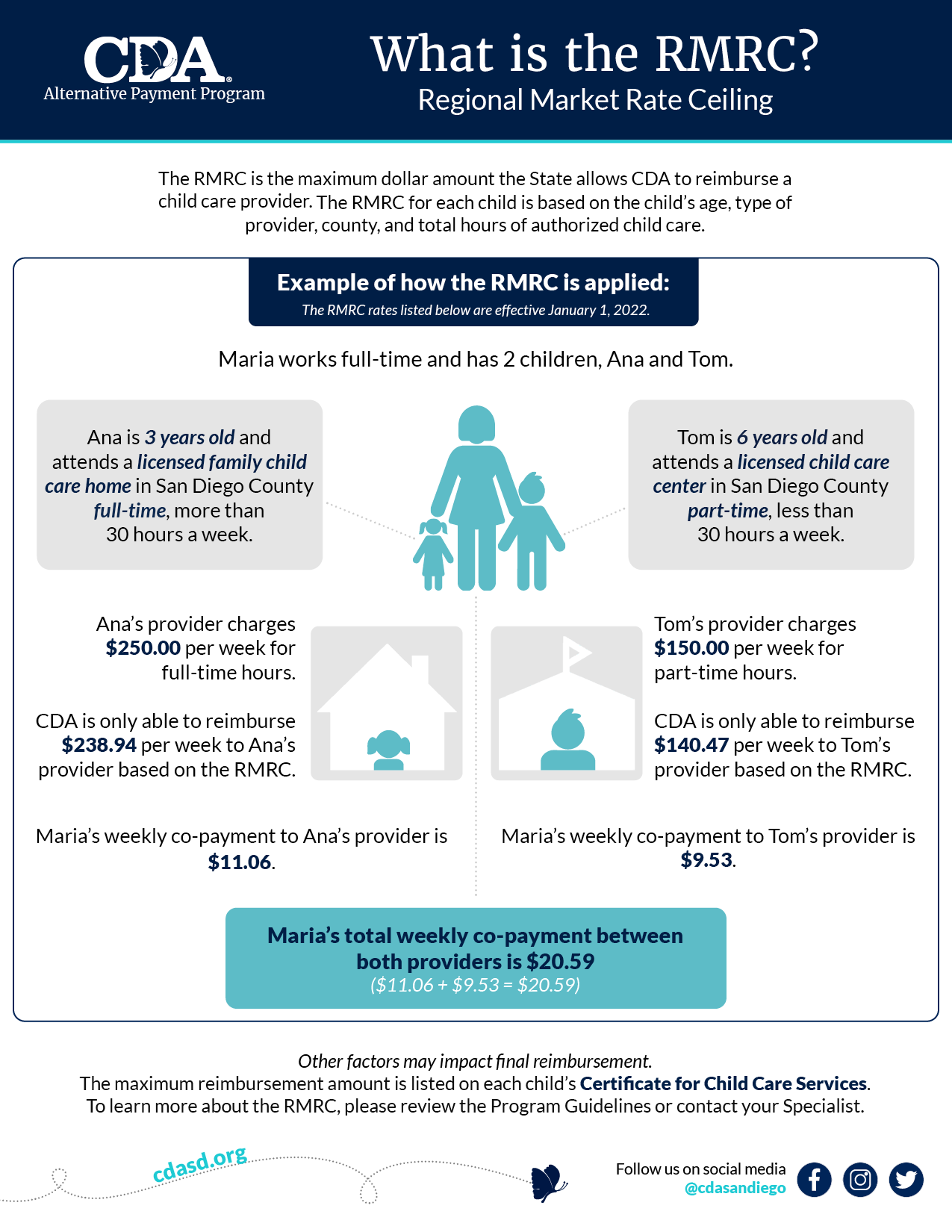
The Regional Market Rate Ceilings (RMRC) are the highest amounts that CDA can reimburse child care providers. The specific ceiling to use for each child is based on the child’s age, provider type and the amount of certified child care. The State of California determines RMRC by surveying providers within the state and finding an average rate by county. A new RMRC became effective on January 1, 2022, click here to access.
It is the parent’s portion of the child care cost. Family fees are determined by the family size, income, and the total amount of child care services approved (full-time/part-time). The full time monthly and part time monthly family fees will be applied based on the monthly hours of the family’s certified need.
- Full-time (“FT”) monthly fee = A certified need of 130 hours or more per the month.
- Part-time (“PT”) monthly fee = A certified need of less than 130 hours per the month.
The Family Fee amount due each month will be printed on the attendance record and must be collected directly from the parent. The fees are automatically deducted from your reimbursement.
A co-payment is the difference between what the provider charges and the highest amount that CDA can reimburse that provider. Co-payments and family fees are not the same and they are paid directly to the provider by the parent.
The certificate for child care services is a notification which informs you of a family’s approved child care services and other information about the child care case. A certificate for child care services shows the following:
- The authorized child care schedule for each child
- The maximum reimbursement amount that you are eligible for, per child
- Family fees, if applicable
Your statement is referred to as Explanation of Payment (EOP) and you can view these for each deposit by logging on to CareConnect Provider.
Beginning Services
The start date for the family is listed on the Certificate for Child Care Services (Addendum to Parents Notice of Action). If you did not receive the Certificate, please contact your Provider Specialist at (619) 427-4411.
If you have not received a Certificate for Child Care Services, CDA recommends you do not accept the child for child care until one is received. The parent is responsible for all services used without CDA’s approval. The provider should be aware care cannot be reimbursed and the parent will be responsible to cover any unauthorized care. CDA does not backdate any change or approval of services.
The child care certificate reflects the maximum child care hours authorized and the maximum Regional Market Rate Ceiling (RMRC) allowed. However, your final reimbursement amount is determined by several factors: the actual care used by the child within the authorized hours, your rates on file with CDA, the RMRC, and your invoiced amount on the attendance records. Every month, we compare these factors to determine your final reimbursement amount.
Providers download attendance records and print their reimbursement statements referred to as an Explanation of Payment (EOP) from the CareConnect. If you cannot access the CareConnect, please contact your Provider Specialist at (619) 427-4411. Due to required perjury statements, only CDA generated attendance records can be accepted for reimbursement.
General
No. The Alternative Payment Program is a parental choice program that allows a family to select a provider that best meets their need. Providers participating are considered independent contractors and are not employees of CDA. Therefore, you are not entitled to Unemployment, Disability, Workers Compensation, Social Security, health insurance or pension benefits from CDA.
Invoicing & Reimbursement
We need to know what you charge for the care you provide and need for you to “invoice or bill” each month. You do this by completing the “Provider Bill/Invoicing” section on each child’s attendance record by filling out what you charge for the care provided. This section allows you to record a monthly invoiced amount (if you charge monthly) or a weekly invoiced amount (if you charge weekly). CDA considers a week Sunday-Saturday.
For short how-to videos on Invoicing, click here.
We know invoicing can be confusing. We recently created a few short videos to help describe the difference between weekly and monthly invoicing. You can find these videos on our website by clicking here. Also, we are now offering new providers one-on-one guidance during their first month of invoicing to answer questions and clarify program requirements for reimbursement. You can always contact your provider specialist if you have any questions about invoicing/billing at (619) 427-4411.
Set child care schedules will be reimbursed according to the amount billed by the provider, the provider’s rate sheet on file with CDA or the Regional Market Rate Ceiling (RMRC) amount listed on the certificate for child care services, whichever is less.
Exception: When a set schedule is authorized with a license-exempt provider for less than 30 hours per week, reimbursement will be based on the part-time hourly RMRC for the actual care provided within each child’s authorized days and hours.
For short videos on reimbursement and the RMRC, click here.
Variable child care schedules are reimbursed for the actual care hours provided that are within the hours authorized. The reimbursement will be the lesser between the amount billed by the provider, the provider’s rate sheet on file with CDA, or the full-time (FT) or part-time (PT) Regional Market Rate Ceiling (RMRC) listed on the certificate for child care services.
For example, a parent is authorized a variable schedule with a licensed provider for up to 35 hours per week, which is considered full time. The parent uses 29 hours, within the authorized days and times, which is considered part-time. The provider’s reimbursement will be based on the part-time weekly RMRC.
Please note: CDA will not reimburse for absences, vacations, holidays, or provider closure days for children with variable schedules, which means the parent may be responsible for a co-payment to the provider for days that the child is absent from child care.
For short videos on reimbursement and the RMRC, click here.
Please submit your updated rate sheet to CDA’s Provider Services. Licensed providers are required to submit their current rate sheet to CDA and the local Resource and Referral (YMCA-CRS). This rate sheet should be the same rate sheet provided to all families, subsidized or not and signed by the provider. The rate sheet is how CDA knows what providers charge for services and use it in conjunction with the Regional Market Rate Ceilings (RMRC) and the child’s schedule type (variable or set) to determine reimbursement.
Discrepancies in the amount paid could happen for various reasons: Errors made on the attendance record, missing times, possible discrepancies in the family’s information in our system, possible misinterpretation of Provider’s Rate Sheet, the amount the provider has billed/requested exceeds the RMRC, Child/children are on varied schedules and all the care hours were not reimbursable.
CDA is a state funded program and we must follow state reimbursement limitations. Therefore, CDA is required to compare the invoiced amount on the attendance record to your rate sheet on file with CDA and the Regional Market Rate Ceilings (RMRC). CDA will reimburse whichever is less. If you ever have questions about your reimbursement amount, please contact your Provider Specialist at (619) 427-4411 who will be happy to assist you
For short videos on reimbursement and the RMRC, click here.
You should wait until the actual “Check Issue Date” of the pay period. At times the reimbursement for the family will come in more than one deposit, and should all be deposited by the end of the day on the “Check Issue Date”.
Attendance records may be submitted to Child Development Associates (CDA) as early as the first business day following the month of child care. Reimbursement will be issued to child care providers within 21 calendar days of receipt of complete Attendance Records. To access our Reimbursement Schedule, click here.
This can be for a couple of reasons:
1) The Attendance Record was received after the due date OR
2) A discrepancy was found with the attendance record information or the child care used
To avoid a reimbursement delay, make sure your Attendance Records are always accurately completed and the invoiced amount matches your rate sheet on file with CDA. In addition, CDA is currently working on identifying new ways to speed up the reimbursement process.
If a parent fails to pay their family fee the provider should notify CDA. When the provider notifies CDA that the parent is not making timely or correct payments on an existing repayment plan, a Notice of Action will be issued to terminate child care services. Please note: Providers cannot waive payment of family fees at any time for any reason. If a family fee payment is waived, both the parent’s and provider’s participation in the Alternative Payment Program may be terminated.
Non-operational days are days you are closed but still request payment for (i.e. holidays). California regulations [Title 5, Section 18076.2(b)(2)] sets the limit Alternative Payment programs can reimburse child providers for days a provider is closed (non-operational days), to no more than 10 days a fiscal year. The provider is only eligible for reimbursement for Non-Operational Days if they require those days to be paid for by non-subsidized families and have supplied CDA with documentation of that requirement.
Please note, if you have any changes in your Non-Operational Days once you have submitted your contractual terms to CDA, you must update your information with us PRIOR to the date of the non-operational day you are requesting reimbursement for. CDA will not adjust reimbursement retroactively for Non-Operational Days retroactively.
Want to stay in touch?
Enter your email to receive our quarterly newsletter about the latest CDA news and updates!
Subscribe